Smart Views Not Visible? How to Find Them
Last updated: October 5, 2026
If you can't find a Smart View, it may be located under a different Hub or have visibility settings that prevent you from accessing it.
Find a Smart View
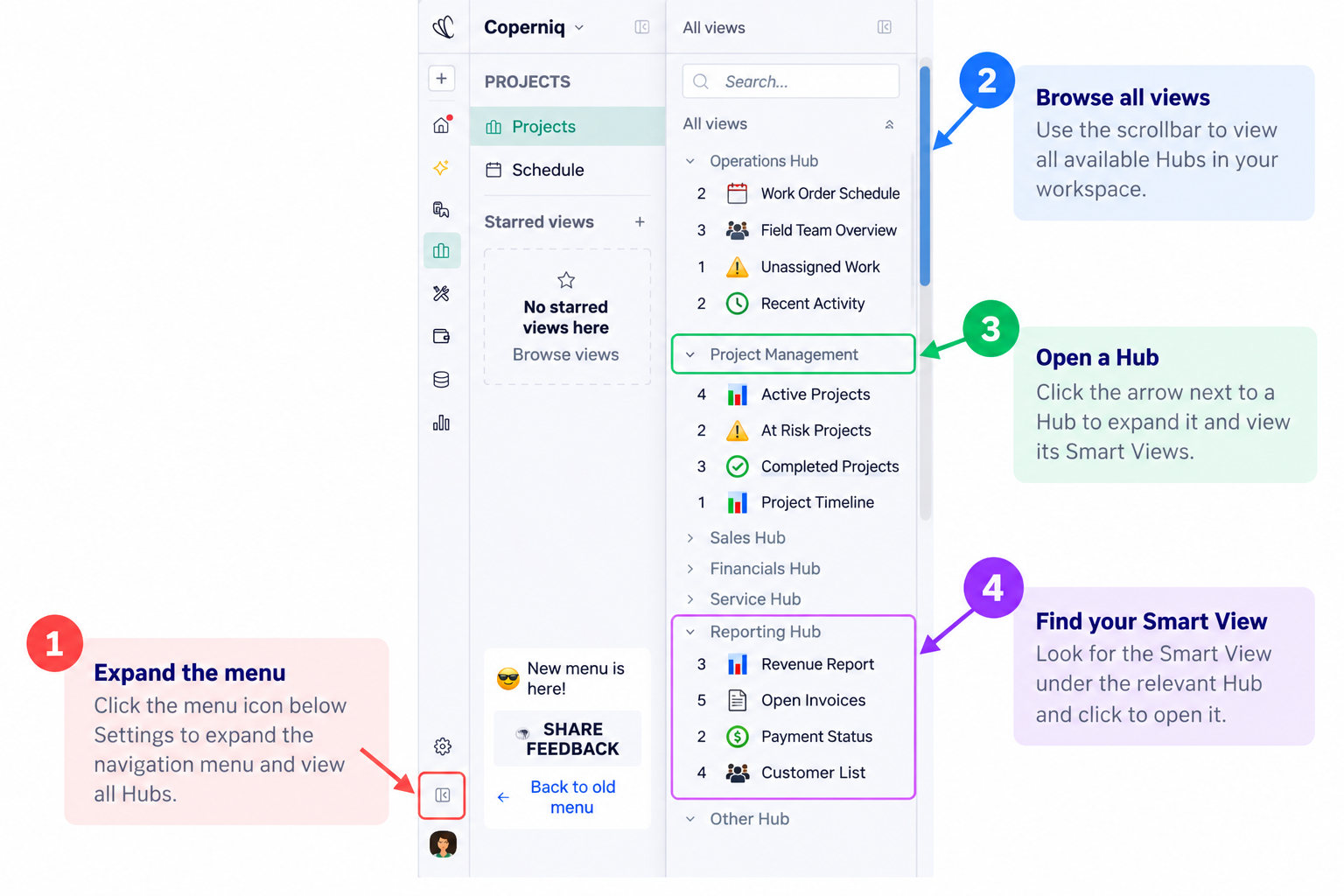
Expand the navigation menu.
Click the menu icon below Settings in the bottom-left corner to expand the navigation menu.Browse all Hubs.
Scroll through the All views panel to see the available Hubs and Smart Views in your workspace.Open the relevant Hub.
Click the arrow next to a Hub to expand it and view the Smart Views organized within it.Find and open your Smart View.
Locate the Smart View under the relevant Hub, then click it to open it.
Still can't find the Smart View?
Check the Smart View's visibility settings.
Smart Views can have different sharing settings, so a view may be available to everyone or restricted to specific users.
If another user can see the Smart View but you can't, ask your workspace administrator or the Smart View owner to confirm that the view is shared with you and that you have the appropriate access.
Tip: If you're looking for a Smart View that you previously had access to, check whether it was moved to another Hub or its sharing settings were changed.