How do I export records to CSV?
Last updated: October 5, 2026
You can export data directly from supported pages in Coperniq, including Work, Projects, Accounts, Invoices, Payments, and more.
Before exporting, you can apply filters and customize your columns to control which data is included in your CSV.
Export data to CSV
From the left navigation menu, open the page you want to export data from.
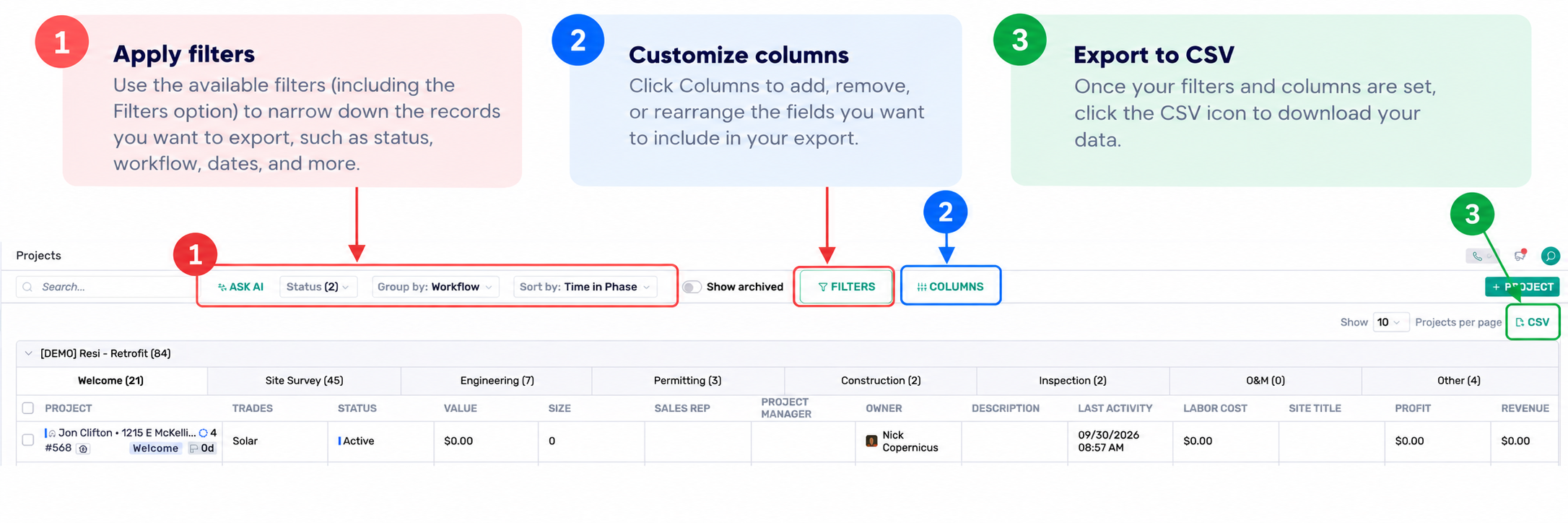
Apply filters, if needed, to narrow down the results you want to export.
Customize your columns to choose which fields you want to include.
Add, remove, or rearrange columns based on the information you need in your export.
Review your view to make sure it contains the right records and columns.
Click the CSV icon in the top-right corner to export.
Your CSV will reflect your current view, including the filters and columns you've selected.
Customize your export
You can combine filters and column settings to create an export tailored to what you need.
For example, you can filter Projects to a specific workflow or phase, then customize the columns to include only details such as the project name, customer, sales rep, status, or other relevant fields.
Once your view is set up, click the CSV icon to export the results.