Coperniq AI — Copilot
Last updated: October 23, 2025
Estimated reading time: 2–3 minutes
Overview
Coperniq AI is your intelligent assistant for Clients, Requests, and Projects.
It understands your data, workflow, and communications — helping you write, summarize, and act faster using natural language or your voice.
AI is available both inside records (for notes, reminders, summaries) and on main module pages (for search, insights, and filtering).
Where You Can Use Coperniq AI
Coperniq AI is available in two main contexts:
Inside records — When viewing a specific Client, Request, or Project, you can use AI in:
Notes & Communication (to write, summarize, or edit messages)
The Copilot panel (to summarize, query, or post actions)
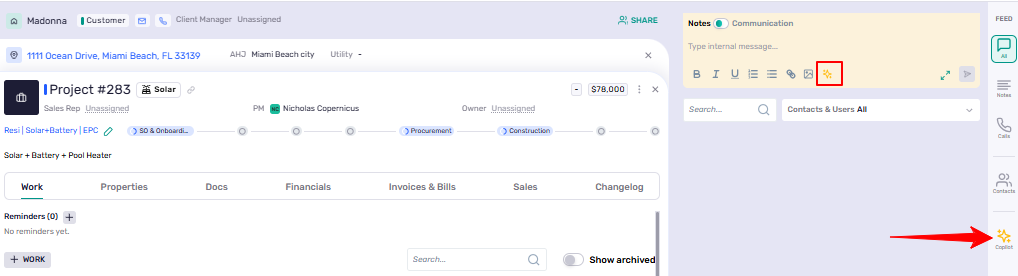
Across module pages — On the Clients, Sales (Requests), and Projects dashboards, Coperniq AI powers search, filters, and insights — enhanced by the built-in microphone 🎙 for voice commands.

AI Inside Records
1. AI in Notes and Communication
In every record, the Notes & Communication panel helps you write clearly and efficiently with AI assistance.
Whether you’re sending a client message or logging an internal update, Coperniq AI can refine your writing in seconds.
AI actions available:
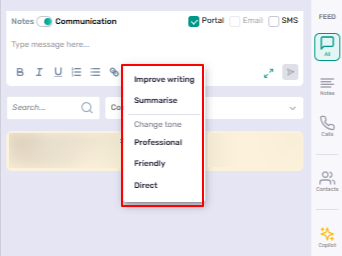
✍ Improve writing – Refines grammar, tone, and clarity automatically.
🧾 Summarize – Condenses long notes or threads into short, readable summaries.
💬 Change tone – Adjusts tone to Professional, Friendly, or Direct.
Supported communication types:
Internal Notes
Comunication-Emails, Portal messages, and SMS
Example:
Draft a message → click the ✨ AI icon → choose Improve writing
Coperniq AI instantly polishes your note before you send or save it.
This keeps all communications — internal and client-facing — consistent, professional, and on-brand.
2. Copilot in the Right Panel
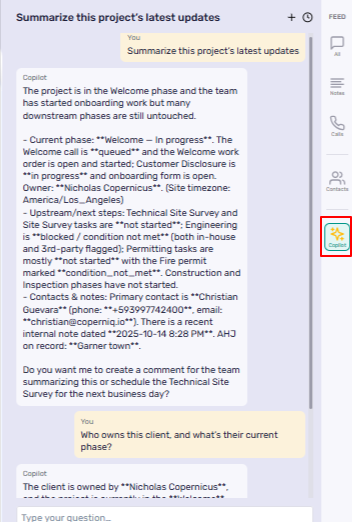
The Copilot tab on the right panel transforms Coperniq AI into a record-aware assistant.
It understands the record you’re viewing — its fields, stage, and communication history — and can perform contextual actions instantly.
What you can do:
Summarize the entire record (latest updates, reminders, communications).
Post comments or internal notes automatically.
Create reminders (e.g., “Remind me to call the AHJ on Friday”).
Retrieve details (e.g., owner, client manager, phase, due date).
Analyze data from Properties, Work Orders, or Communication threads.
Example prompts:
“Summarize this project’s latest updates.”
“Who owns this client, and what’s their current phase?”
“Add a note to follow up after inspection.”
Copilot performs your action immediately — and all AI-generated content is reviewable before posting.
AI on Main Module Pages
On the Clients, Sales (Requests), and Projects dashboards, Coperniq AI helps you find insights, surface data, and take action using simple natural language.
You can type directly into the search bar — or click the microphone 🎙 to speak your command hands-free.


1. Projects — Track and Analyze Instantly
Coperniq AI enhances your visibility across all active projects. Working alongside your existing filters and sorting tools, it helps you quickly locate records, summarize progress, and surface key insights using natural language or voice commands
Example prompts:
“Show all projects owned by Jason in Engineering or Installation.”
“List projects valued over $100K not yet closed out.”
“Which projects haven’t been updated in two weeks?”


“Summarize my active projects and overdue work orders.”
“What’s the total project value by workflow stage?”
How it helps:
Instant portfolio overviews.
Quick insight into delays or risks.
Ideal for weekly reviews or management summaries.
2. Sales (Requests) — Qualify and Forecast Faster
In Sales → Requests, Coperniq AI acts as a digital sales analyst — surfacing leads, tracking progress, and forecasting outcomes automatically.
Example prompts:
“Show new requests created this week.”
“List opportunities in ‘Proposal Requested’ with confidence above 50%.”
“Which requests were Closed Won this month?”
“Summarize leads waiting for proposal approval.”
How it helps:
Better pipeline visibility in real time.
Faster sales qualification and prioritization.
No need for manual reports or spreadsheets.
3. Clients — Understand and Engage Better
Coperniq AI helps you manage client relationships intelligently.
It can pull key activity, engagement history, and linked records at a glance.
Example prompts:
“Summarize this client’s activity and open projects.”
“Show commercial clients managed by Elisa.”
“List clients with no updates in 30 days.”
“Summarize communications for Stephanie Claitt.”
How it helps:
Perfect for meeting prep or follow-ups.
Identifies inactive or at-risk accounts.
Enables quick, data-driven client insights.
Best Practices
Use natural language — no filters or special syntax needed.
Be specific — add context like dates or names
Try voice input for faster interactions.